
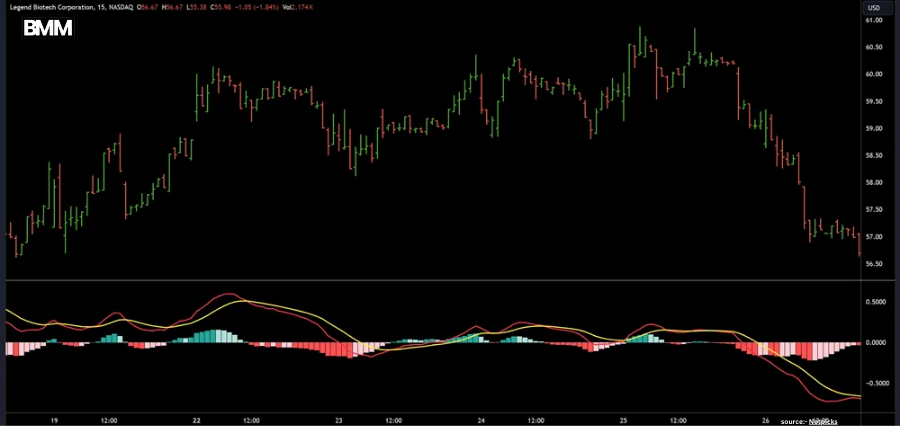
Technical indicators play a crucial role in modern trading, helping traders identify trends, momentum, and potential entry or exit points. Among these tools, the Moving Average Convergence Divergence indicator, commonly known as MACD, remains one of the most widely used. However, many traders struggle not with understanding MACD itself, but with choosing the best MACD settings for different markets and trading styles.
Traders have modified the MACD indicator throughout time for intraday, swing, and even scalping tactics, while it was initially intended for longer-term trend monitoring. Improving decision-making and lowering false signals requires an understanding of how MACD operates and how to modify its parameters.
What Is MACD and Why Settings Matter?
MACD is a momentum indicator that tracks the relationship between two moving averages of price. It consists of three components:
- The MACD line
- The Signal line
- The Histogram
The default MACD settings are 12, 26, and 9, representing the fast moving average, slow moving average, and signal line, respectively. While these defaults are popular, they are not always the best MACD settings for every trader or market condition.
The speed at which various assets move varies. A setting that is effective for long-term stock investing might not be appropriate for trading cryptocurrency or forex. Traders can align the MACD indicator with the timeframe and market volatility by adjusting its parameters.
Best MACD Settings for Swing Trading
Swing traders aim to capture medium-term price movements over several days or weeks. For this style, the default 12, 26, 9 settings often remain the best MACD settings because they filter out short-term noise while still reacting to trend changes.
A lot of swing traders use support and resistance levels in conjunction with MACD crosses. Growing momentum is frequently indicated when the MACD line crosses over the signal line during an upswing. A bearish crossover during a downturn, on the other hand, may signal waning price strength.
Best MACD Settings for Day Trading
Day trading requires faster signals because positions are opened and closed within the same session. In this case, traders often prefer more sensitive MACD parameters.
Popular MACD settings for day trading include 8, 17, 9 or 5, 13, 6. These shorter values help the indicator respond more quickly to price changes, making them some of the best MACD settings for intraday strategies.
However, increased sensitivity also increases false signals. For this reason, MACD should be used alongside volume indicators or price action confirmation.
Best MACD Settings for Scalping
Scalping is a high-speed trading style focused on very small price movements. Scalpers typically operate on one-minute or five-minute charts and require extremely fast indicators.
Common MACD settings for scalping include 3, 10, 16 or 6, 13, 5. These are considered best MACD settings for scalping because they provide rapid momentum shifts. Traders often focus on histogram changes rather than crossovers to anticipate short-term reversals.
Due to the aggressive nature of scalping, strict risk management is essential when using such fast MACD configurations.
Best MACD Settings for Forex Trading
Forex markets operate 24 hours a day and exhibit strong trending behaviour. Many forex traders stick close to default MACD settings but adjust them slightly depending on the currency pair.
For major pairs like EUR/USD or GBP/USD, 12, 26, 9 or 10, 20, 5 are often considered the best MACD settings. These values balance responsiveness with stability, especially during high-liquidity sessions such as London and New York.
MACD divergence is particularly effective in forex trading, helping traders identify potential trend reversals before price reacts.
Best MACD Settings for Crypto Trading
Cryptocurrency markets are highly volatile, making indicator sensitivity especially important. Crypto traders often use faster MACD settings to capture sudden momentum shifts.
Popular crypto MACD settings include 8, 21, 5 or 6, 13, 9. These are frequently cited as some of the best MACD settings for Bitcoin and altcoins because they adapt better to sharp price movements.
Because crypto trades continuously, MACD works best when combined with trend filters such as moving averages or RSI.
Should You Change MACD Settings?
There is no universal answer to what the best MACD settings are. The effectiveness of any configuration depends on:
- Timeframe
- Market volatility
- Asset type
- Trading strategy
Many experienced traders test multiple MACD settings through backtesting before committing to one approach. The key is consistency. Constantly changing settings can lead to confusion and emotional trading.
Final Thoughts on Best MACD Settings
MACD remains one of the most versatile indicators available to traders, but its power lies in proper configuration. The best MACD settings are not about copying a single formula, but about aligning the indicator with your strategy and risk tolerance.
Whether you are swing trading stocks, day trading forex, or scalping crypto, understanding how MACD settings affect signal speed and accuracy can significantly improve your trading performance. With disciplined testing, clear rules, and sound risk management, MACD can become a reliable component of any trading system.
Also Read :- Business Minds Media For more information